 English
 Español
 Português
Get new phone staff ready before their first real call
With the Call Simulator in CallCoach AI, your team practises spoken calls with an AI customer in the browser. Each practice call gets a report on the same scorecard as your real calls.
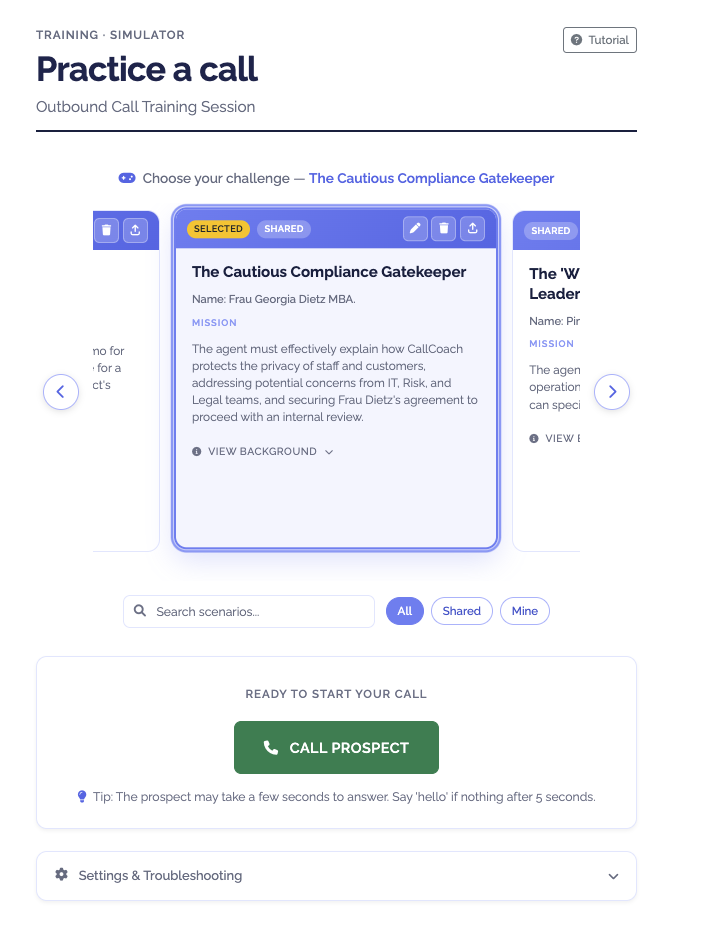
Practise, get the report, go again
Nothing to install. Open the browser, put on a headset and start talking.
Practise a spoken call
Your agent talks with an AI customer in English, Spanish or Portuguese. They can interrupt, as in a real call. The AI customer reacts to how it is treated, and it can hang up.
Get the report in a couple of minutes
Every practice call of a minute or more is analysed against your own scorecard, the one you use for real calls. The report shows on screen and arrives by email within a couple of minutes.
Go again, then check the real calls
Practice scores stay apart from real-call scores, so nobody is marked down for practising. CallCoach also analyses your real calls after they happen, so you can see whether the practice shows up with customers.
Set the bar before new starters take real calls
Group scenarios into an onboarding module, set the rule for passing and assign it with a due date. On the Business and Enterprise plans.
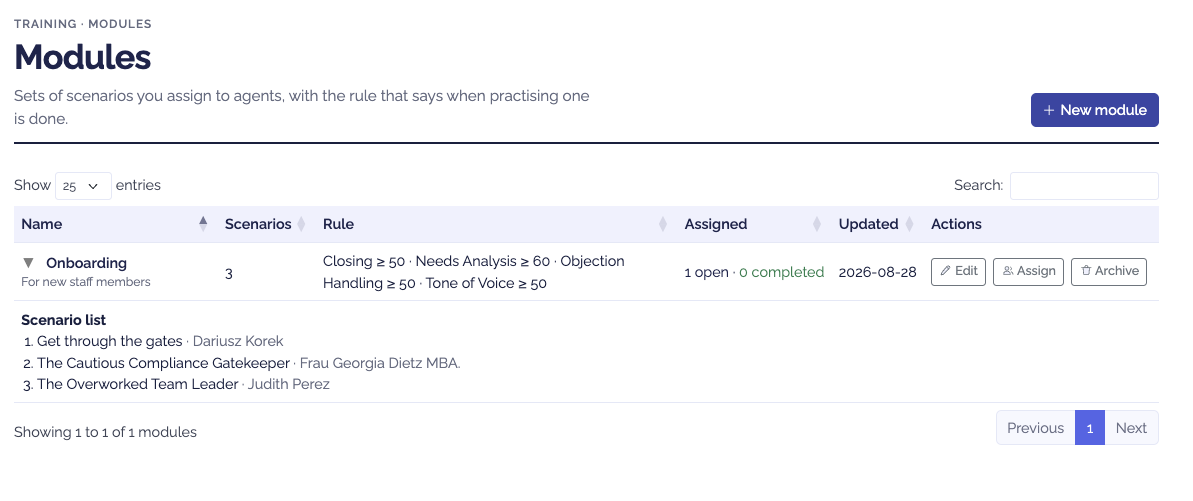
An onboarding module: three scenarios and the scores an agent must reach to pass.
You decide what done means
A module is done when the agent has practised once, or when they reach your minimum scores in a single call. For example, Needs Analysis 60 or higher and Closing 50 or higher.
Assign it with a due date
Pick the agents and set the date. Each agent gets an email with a link to the module.
See who is ready
For each agent you see assigned, in progress, completed or overdue, their best score per skill against your rule, and every practice session. You can export it as CSV.
A My training page for each agent
Agents see what to practise next, their progress, their practice history and their own weekly reviews.
Turn a hard call into practice for the team
Managers and agents make their own scenarios: from a short description, from an agent's reviews or from a real call.
One click from a real call
You see a call that went badly in a call report. Click Simulate on that report and CallCoach builds a practice scenario based on it.
Built from an agent's weak spots
CallCoach can build a scenario from the gaps in an agent's own reviews. Each person practises the skill they keep missing.
Share it or assign it
Share a scenario with the whole organisation, or assign it to one agent who needs more practice on one type of call.
Berlitz got new sales staff up to speed twice as fast
Berlitz's consumer sales teams in Mexico and Colombia have 80 sales agents. They coached with CallCoach, and new staff practised in the Call Simulator in Spanish. That practice helped new staff get up to speed in 6 weeks, down from 12. Sales-team turnover halved.
New staff got up to speed twice as fast: 12 weeks to 6
Sales-team turnover halved
Try a practice call yourself
We are opening a short practice call that anyone can try in the browser. Leave your email and we will send you the link.
Thanks. We will email you the link when the practice call opens.
That did not go through. Email us and we will add you: support@icana.ai
We only use your email to send you the link. No newsletter.
On every CallCoach plan
The Call Simulator is on every plan, in English, Spanish and Portuguese. Business includes 50 practice sessions a month and Enterprise includes 200. On Starter and Team you add practice packs. Training modules, assignments and progress tracking are on Business and Enterprise.
Get your new starters ready for real customers
See the Call Simulator and training modules in a short demo. Set up in days, not months.